DDoS detection
DDoS detection from the flow data you already have
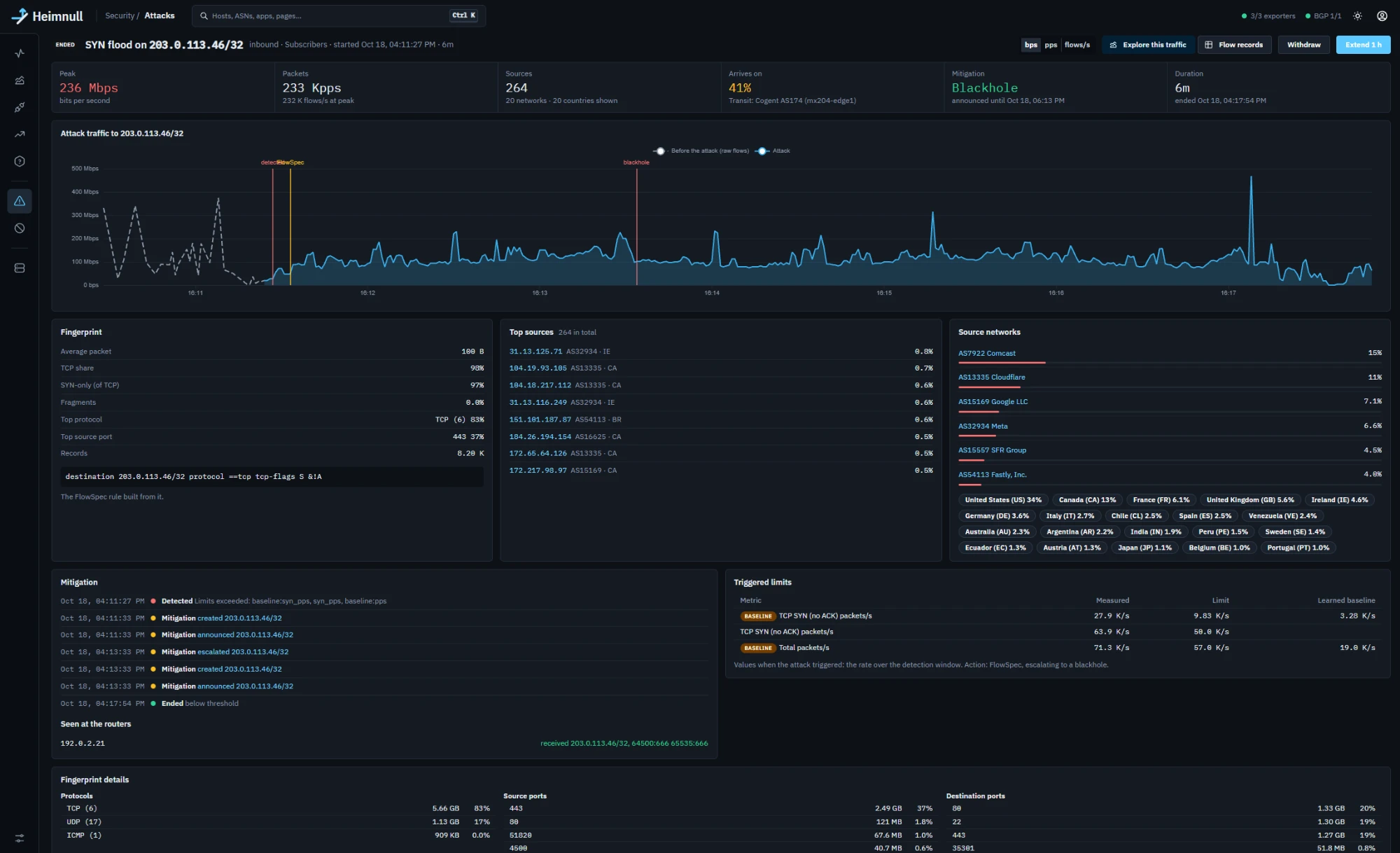
Heimnull reads NetFlow, IPFIX and sFlow from your routers and checks every active host, every second, in both directions. A flood five times over its limit is an attack on record about 5.5 seconds after Heimnull sees its first packet, typed from its fingerprint, with its chart, sources and a sample of its flows.
What Heimnull watches
Every host, every second
Each active host is checked against its limits once a second, inbound and outbound, in memory as the flows arrive. Over 100,000 hosts are tracked at once, with idle ones evicted first.
Limits that fit each network
Hosts belong to hostgroups, and each hostgroup has its own limits for bits, packets, SYN packets, fragments, amplification by protocol and ICMP. Up to 16 flex rules per hostgroup add limits by port, ASN, country or packet size.
Whole prefixes too
A hostgroup's aggregate is checked as well as each host, so an attack spread thinly across a prefix is caught as carpet bombing even when no single address looks attacked.
Your own hosts, outbound
Outbound limits catch a compromised server of yours taking part in an attack, with their own thresholds.
Learned baselines
Static limits catch floods. Baselines catch what is unusual for one host at one time of the week, even below its limits.
Heimnull learns each host's and hostgroup's typical peak for every hour of the week from the last four weeks, leaving attacks out so they never become normal. Start in observe mode and compare the learned band with real peaks on the host page, then let it act like any other limit.
Attacks, typed and recorded
Each attack is typed from its fingerprint: a SYN flood, an amplification attack named by its protocol (DNS, NTP, SSDP, CLDAP, memcached and ten more), a fragment flood, an ICMP flood, or carpet bombing. Its page keeps the traffic chart from before it began, its top sources by address, network and country, a sample of its flow records, and every action taken.
Detection and analytics read the same copy of your flow data, so the chart you look at is the number the attack was judged on. Sampled data is scaled by each router's own sampling rate, and a flood is caught at its true rate however late a router exports its records.
From detection to action
Choose per hostgroup what happens when an attack starts: notify only, a FlowSpec rule that drops just the attack, a blackhole for the address, or FlowSpec that escalates to a blackhole if it isn't enough. Alerts go to email, Slack, Microsoft Teams, Telegram, ntfy or a webhook.
Detection works on every edition, including the free one; mitigation over BGP needs a license. IPv4 and IPv6 are handled the same way throughout: see IPv6 DDoS protection.
Questions
Does Heimnull sit in the traffic path?
No. It reads flow data your routers export and tells your routers what to drop over BGP. If Heimnull stops, traffic keeps flowing.
How fast is detection?
It depends on how far over its limit an attack is. With the default settings, an attack at five times its limit or more is detected about 5.5 seconds after its first packet reaches Heimnull, and one at 2.5 to 5 times its limit after about 6.5 seconds. Routers usually export flows some seconds after the traffic, which adds to that.
Which routers work?
Any that export NetFlow v9, IPFIX or sFlow v5. The docs have setup guides for Juniper MX, Juniper EX, Juniper SRX and MikroTik.
Is detection included in the free edition?
Yes. Free includes analytics up to 500 Mbps, detection, baselines and notifications. FlowSpec and blackholes need a license, and every installation starts with 30 days of everything.
Related
See it on real traffic
Install Heimnull on your own server in about ten minutes: every feature free for 30 days, then free for analytics up to 500 Mbps. Or click through the demo, with attacks and mitigations on made-up traffic.
info@heimnull.com