FlowSpec mitigation
FlowSpec rules, built from each attack
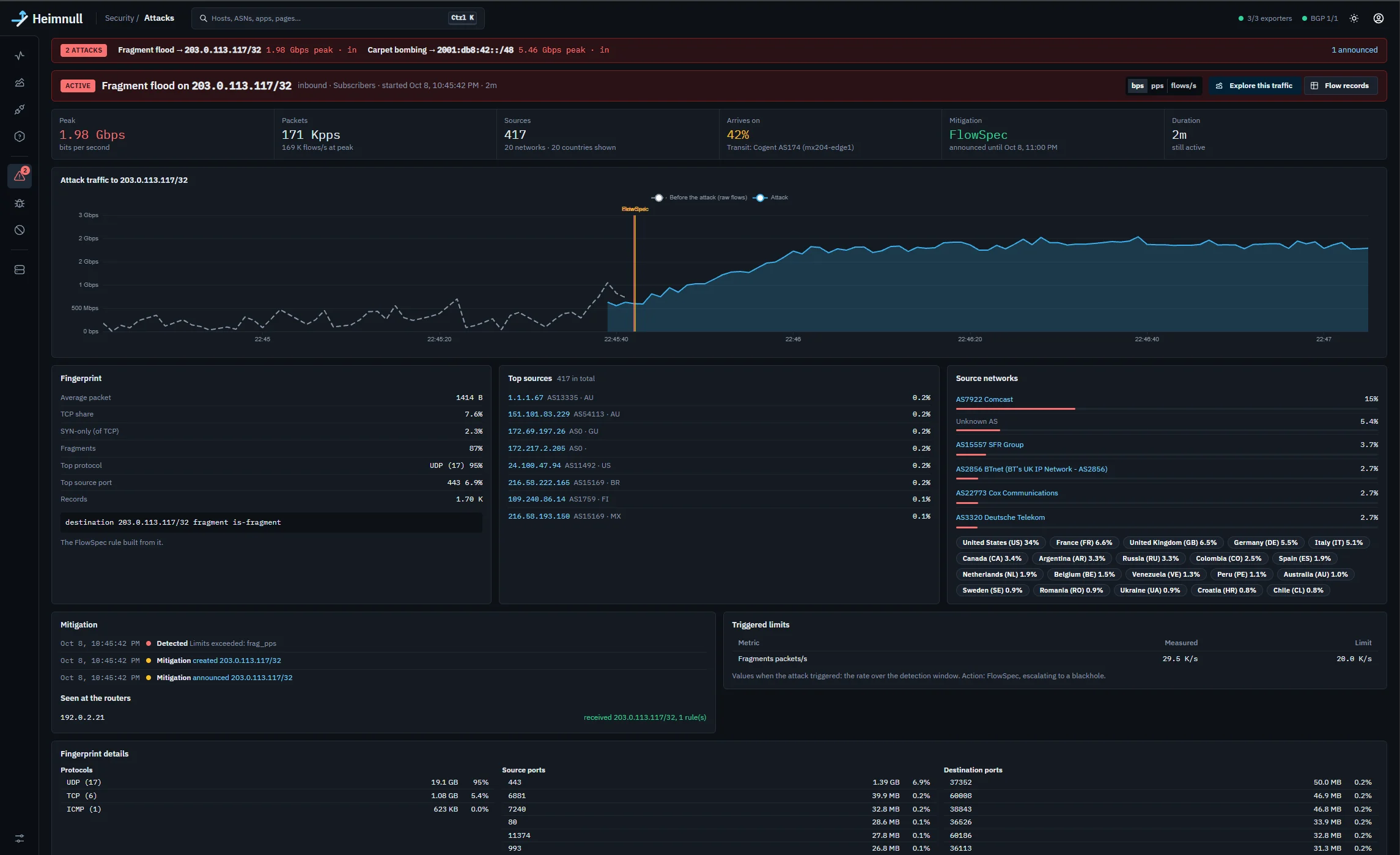
When an attack starts, Heimnull measures its fingerprint, turns it into a BGP FlowSpec rule that matches the attack and little else, and announces it to your routers. They drop the flood at your edge, and the server it was aimed at stays online.
Why FlowSpec rather than a blackhole
A blackhole drops every packet sent to the address, so the host goes offline and the attacker gets what they wanted. A FlowSpec rule (RFC 8955 for IPv4, RFC 8956 for IPv6) can match on protocol, ports, packet length, TCP flags and fragments as well as the address. The router discards the attack and keeps forwarding the rest of the host's traffic.
Writing those rules by hand during an attack is slow and easy to get wrong. Heimnull writes them from what it measured, seconds after detection, and checks every one before it's sent.
From fingerprint to rule
While an attack is active, Heimnull collects its fingerprint from the flow data: protocols, source and destination ports, TCP flags, packet sizes and fragments. The attack's type decides what the rule matches.
| Attack | The rule matches, for the attacked address |
|---|---|
| SYN flood | TCP with SYN set and ACK clear, plus the destination ports when four or fewer of them carry 90% of the packets |
| UDP amplification | UDP from the reflector's source port (DNS, NTP, SSDP, CLDAP, memcached and 10 others by default), within the packet-length range that holds 90% of the packets. A second, fragments-only rule is added when 20% or more of the packets are fragments. |
| Fragment flood | Fragments only |
| ICMP flood | ICMP or ICMPv6, within the attack's packet-length range |
| Anything else | The dominant protocol, when it carries 90% or more, and its ports |
A fingerprint with nothing to match beyond the address is refused as a FlowSpec rule, because it would drop everything like a blackhole. With escalation on, Heimnull goes straight to a blackhole instead.
What the rule does
Pick the action per hostgroup. Heimnull sends it as a FlowSpec extended community with the rule.
Discard
Drop every packet that matches. Sent as a traffic rate of zero.
Rate-limit
Let the matching traffic through up to a rate. You enter bits per second; Heimnull converts it to the bytes per second RFC 8955 expects.
Redirect
Send the matching traffic to a VRF by route target, for example towards a scrubbing path.
Remark
Rewrite the DSCP value of the matching packets, so the rest of your network can treat them differently.
Escalate to a blackhole when a rule isn't enough
Choose “FlowSpec, escalating to a blackhole” for a hostgroup. If the attack stays above a rate you set for the escalation delay (60 seconds by default), Heimnull also announces a blackhole for the address.
To know whether the rule is holding, Heimnull needs to see what gets past it. With your router sampled on both sides of its filters (on a Juniper MX, the output of the units facing your own networks), Heimnull charts the rate delivered past the router and escalates only on that. Without it, the arriving rate never drops, so FlowSpec always escalates, and the settings say so.
Safe to leave on
Automatic mitigation is only useful if you trust it at 3 a.m. Every rule passes the same checks, whether detection asked for it or you did.
- Off until you choose. Every hostgroup starts at “notify”. Nothing is announced until you pick an action for it.
- Preview and dry run. See exactly what each BGP session would receive, rules and actions, before anything is sent.
- Checked before every announcement. The address must be inside your networks and not whitelisted, the rule must match more than the address, and a session must carry FlowSpec for that address family.
- What the router got. After announcing, Heimnull reads each session's Adj-RIB-Out and records what was actually sent.
- Drift corrected. Every 30 seconds the rules in BGP are compared with the mitigations Heimnull holds. Missing rules are re-announced and stray ones withdrawn, and each fix is logged.
- A cap and a stop button. At most 100 active mitigations by default. Emergency withdraw-all removes every route at once and holds until an admin resumes.
- Restarts are safe. Restarting Heimnull withdraws nothing, and if its BGP daemon restarts, the rules come back on reconnect.
- Everything recorded. Every announcement, refusal and withdrawal is in the attack's timeline and the audit log, and can be sent by email or Telegram.
Router support
Heimnull works with routers that accept FlowSpec over BGP, in the ipv4-flowspec and ipv6-flowspec families. You turn each family on per session.
The Juniper MX setup guide covers the session, standard term ordering and validation. RFC 8955 only accepts a flow route from the router that originated the best unicast route for its destination. Heimnull doesn't announce that route, so the MX skips the check for Heimnull's session with no-validate.
MikroTik RouterOS has no FlowSpec. On those routers Heimnull uses blackholes.
# Juniper MX: FlowSpec from Heimnull's iBGP session
set protocols bgp group heimnull family inet flow no-validate heimnull-flow
set protocols bgp group heimnull family inet6 flow no-validate heimnull-flow
set routing-options flow term-order standard

# Accept flow routes only from Heimnull
set policy-options policy-statement heimnull-flow term from-heimnull from neighbor 10.0.0.10
set policy-options policy-statement heimnull-flow term from-heimnull then accept
set policy-options policy-statement heimnull-flow term reject-rest then reject
Example addresses. Check the statements against the documentation for your Junos release.
Questions
Does Heimnull sit in the traffic path?
No. It reads flow data your routers already send and talks BGP to them. The routers do the filtering, in hardware, at line rate.
How quickly is a rule announced?
Heimnull's own share, from the first packet it sees to an attack record, is about 5.5 seconds for a flood five or more times over its limit, and announcing takes under half a second more. On a Juniper MX with inline monitoring, samples arrive within about a second, which makes about 7 seconds from attack start to rule. Exporters with a flow cache add their inactive timeout.
Does it work for IPv6?
Yes. IPv6 rules use the ipv6-flowspec family (RFC 8956), and ICMP floods over ICMPv6 get ICMPv6 rules. See IPv6 DDoS protection.
What about attacks from my own hosts?
Heimnull detects outbound attacks too, with their own limits. An outbound rule matches your host as the source. Outbound attacks only notify by default.
What if an attack hits many addresses at once?
That's carpet bombing. A rule covering more than one address needs an explicit switch on the hostgroup and a minimum prefix length.
Related
See it on real traffic
The demo runs the full console on made-up traffic, with attacks and mitigations to click through. To try Heimnull on your own network, write to us.
info@heimnull.com